CIAM Supported Login Methods
The Authentication process tells an application who the current user is and whether or not he is authorized to access it. Authentication is all about the user and his presence with the application. Currently the CIAM supported Login methods are:
- Local Authentication
- Federated Authentication
- Routed Authentication
- Passwordless-SMS Authentication
For each of the above mentioned methods it is also possible to enable the Multi-factor Authentication
Local Authentication
The responsibility of the “local authentication” mechanism is to authenticate a user with locally (to the CIAM) available credentials. Once an external user attempts to login to the WFP application, the Service provider sends an authentication request to the CIAM. The request is captured by the proper Inbound authenticator component, it is processed, then sent to the ‘IN’ channel. Here, the claim is checked against the inbound request type configuration. If the checking is positive, the authentication request is sent onwards to the local authenticator. Once the authentication process is complete, a response is sent to the ‘OUT’ channel of the authentication framework. Here, the request response is built and sent to the Service Provider.
Federated Authentication
Federated SSO Authentication allows a WFP’s user (or trusted partner user) to use their credentials within the CIAM. The CIAM’s authentication framework can link to a person’s digital identity (and related attributes) stored into an external Identity Management System. CIAM is federated with the WFP’s Enterprise Identity Management System (which is considered a trusted authority). Federated SSO Authentication resolves the problem of allowing access to internal resources by external and internal users with a reduced administrative overhead (Administrators don't have to contend with many of the issues that come with balancing multi-domain access).
Routed Authentication
Routed Authentication allows both WFP and external users to login within the CIAM. This type of authentication is splitted in two steps:
- User is asked to insert only the email
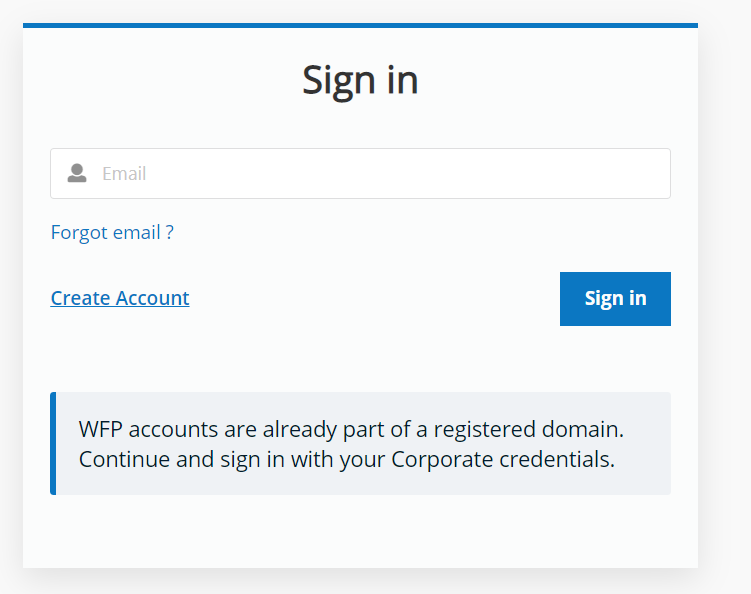
- In case of WFP domain the user is redirect on the WFP’s Enterprise Identity Management System, otherwise the user is redirect on the local authentication page.
Passwordless-SMS Authentication
Passwordless authentications allow users to login without the need to remember a password. Instead, users enter their mobile phone number or email address and receive a one-time code or link, which they can then use to login. The benefits of using Passwordless authentication include:
- Improved user experience, particularly on mobile applications, because users only need an email address or mobile phone number to sign up;
- enhanced security: Passwords are a major vulnerability as users reuse passwords and are able to share them with others. Passwords are the biggest attack vector and are responsible for a significant percentage of breaches. They also lead to attacks such as credentials stuffing, corporate account takeover, and brute force attacks;
- It reduces total cost of ownership, as managing passwords is expensive (password complexity policies, password expiration, password reset processes, password hashing and storing, breached password detection).
Passwordless SMS authentication is the simplest way to onboard mobile users. There are numerous use cases, in WFP, where it is necessary to facilitate user access from mobile devices, without the burden of managing complex authentication mechanisms. Some examples are: Farm2Go and School Meals.
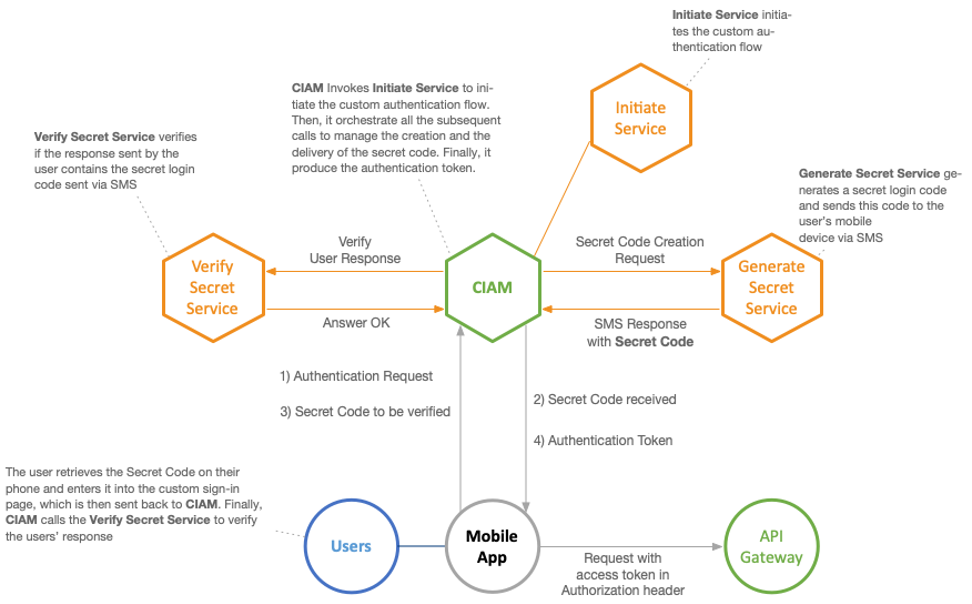
Passwordless SMS is convenient (it removes access barriers for some particular types of users) and secure (The users don’t have to remember what username/password they used or, even worse, they use same username/password for all their accounts). With an SMS connection, the user is asked to enter a phone number to which CIAM sends an OTP code. If the phone number attached to the code matches an existing user, CIAM authenticates that user.
Multi-factor Authentication
CIAM allows configuring multi-step authentication, where it is possible to define an authentication chain containing different authenticators (local, federated and multi-option authenticators), in different steps. This chain is converted to a Multi-factor authentication chain by adding different factors of authentication to each step. Authentication factors in MFA relies on two or more independent credentials that fall into three categories:
- Knowledge factors: Things only the user knows, such a password;
- Possession factors: Things only the user has, such a security token or a mobile phone;
- Inherence factors: Things only the user is, such a fingerprint or a facial recognition;
CIAM has implemented a 2-factor authentication mechanism with the username and password as the first factor and SMS OTP/Email OTP as the second authentication factor. It is possible to enable other connectors, like RSA or TOTP, or extend the current 2-FA adding more factors. CIAM, by request, can implement more sophisticated and granular control mechanisms. If conditional-based (critical functions), context-based (age, domain, IP, IDP, etc.) or event-based access policies are defined, MFA can be enabled based only for that specific events/criteria (Adaptive authentication). WFP manage sensitive data and it has the obligation to be compliant with regulations on data protection and information security. These regulations establish that, under certain circumstances, MFA must be used.

The main benefits associated with the use of MFA concern
- Improve security: by adding additional protection in layers/factors. The more factors are in place, the minor is the risk of an identity stolen or an intruder trying to gain access to a protected resource;
- Achieve compliance: to internal or international regulations;
- Increase flexibility: with Adaptive authentication, the business has more options on how to manage the security of its applications;